Tournament page
The tournament page is the event’s public hub. Open it by clicking the tournament name on its card. No sign-in is required. View event conditions, registered participants, pairings and current standings.
This guide covers the viewing interface. Organizer actions — editing settings, registration, creating rounds and finishing — are covered in Managing a tournament.
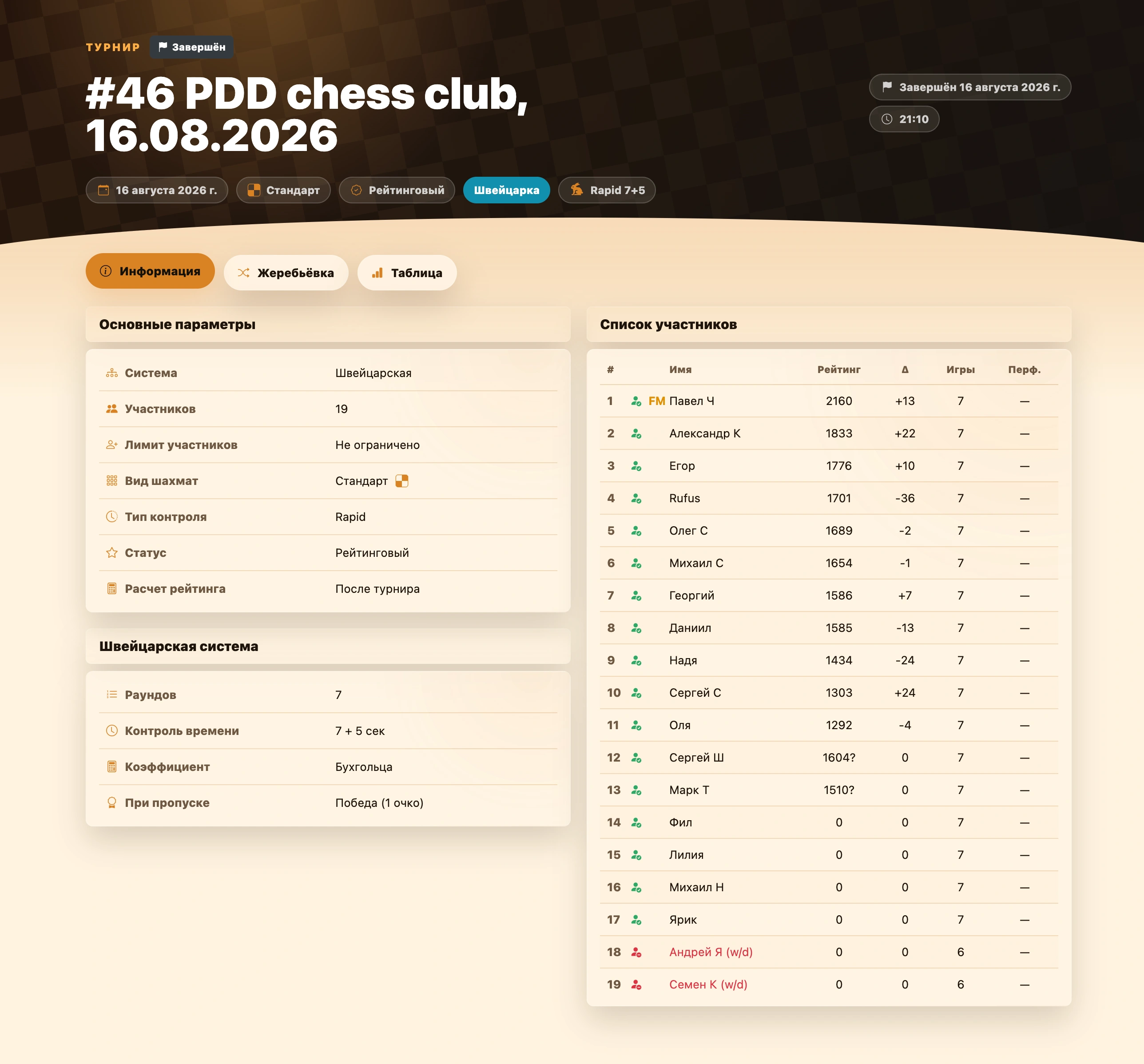
Tournament header
The top of the page identifies the event and its current state.
- Status appears above the name. Created means the tournament has not started; In progress means play is underway; Finished means results are finalized. Finished events also show the completion date and time.
- Name and description come from tournament settings. If no description was entered, none is displayed.
- Date and time show the schedule. Time appears only if specified.
- Chess variant, rated status, system and time control category appear as compact icon labels corresponding to variant, rated status, system and time control.
- Season appears only when the event belongs to one. Click its name to open the season page and results.
Guests, players and administrators see the same header. Administrator controls for their own club are outside this guide’s scope.
Tournament sections
Three tabs appear below the header. The active one is highlighted; select information, pairings or standings.
Detailed settings and participants. Opens by default.
Rounds, pairings, matches and results. See Tournament pairings.
Information tab
Two columns show event conditions on the left and participants on the right. Narrow screens stack settings above participants.
Basic parameters
The first block always shows general properties:
| Field | What it shows |
|---|---|
| System | Swiss, round robin, playoffs or mixed. Mixed events also show the qualification system. See Tournament systems. |
| Participants | Registered player count, including individual players rather than teams in team events. |
| Participant limit | The organizer’s maximum player count, or Unlimited. |
| Chess variant | Selected discipline and icon. See Chess variants. |
| Time control category | Classic, Rapid, Blitz or Bullet. Exact game time appears in the system block. See Time controls. |
| Status | Rated or Friendly. |
| Rating calculation | Rated events only. Currently ratings are calculated after completion; per-match calculation is not used. |
Format and system settings
The selected format and system settings appear below.
- Team settings appear only for team play: fixed or random teams, opponent pairing mode, team size and board format. See Format and teams.
- Swiss shows rounds, time control, tiebreak and BYE scoring. See Swiss system.
- Round robin shows cycles, rounds, time control, tiebreak and odd-cycle color rules. See Round robin.
- Playoffs shows time control, bracket type, each bracket’s field, series winning condition and color rule, if set. See Playoffs.
Mixed events show two blocks: Swiss or round-robin qualification settings and separate playoff settings, so both stages can be reviewed together.
Participant list
The right column on Information shows the current lineup. If empty, it displays No players added yet.
Each row shows number, participation status, title, name, rating, games played and performance. Rated events add Δ, rating change, between rating and games. Values correspond to this event’s variant and time control.
Two compact columns may follow the name: labels, then categories. They identify club-specific player attributes and leagues or groups. An uploaded image appears as a thumbnail; otherwise a colored dot is shown. Hover for the full name.
Visitors see only publicly visible marks. Club administrators also see internal marks. Finished tournaments retain the labels and categories captured when final standings were generated, so later profile changes do not rewrite history. See Labels and categories.
A green player icon marks an active participant.
Withdrawn participants remain listed in red; their results stay in history.
A replaced player appears immediately below the current participant with a replaced label. This shows slot history without mixing individual statistics.
See Registering participants for lineup, substitution and withdrawal rules.
Fixed teams and substitutions
Fixed-team lists have a teams/players switch. A second switch appears when substitutions exist.
- Teams / players. Available for fixed teams. Switch between team and player lists. Team rows show name, members, average rating, total rating change, games and average performance.
- By slots / by players. Appears when substitutions exist. By slots combines results of everyone who occupied the slot; By players shows each person’s own games and statistics.
Mixed system: selecting a stage
Mixed events let you select qualification or playoffs on Pairings and Standings.
For round-robin qualification, the first button is labeled Round robin and uses its icon .