Creating a season
For club administrators
Club administrators can create seasons. This guide configures a new tournament series. See Seasons for the interface and reading standings.
A season combines several tournaments into player standings. Creation sets scoring, limits and additional bonuses.
Opening season creation
Enter your club context and choose Create → Season. Alternatively, click New season on Seasons.
Create → Season. Opens season setup for the selected club.
Season creation wizard
The wizard has four steps. The indicator shows the current and completed steps.
General information. Series name, URL, dates and description.
Scoring settings. Base points, tied results, limits and tiebreaks.
Bonus points. Manual fields and automatic rules.
Confirmation and launch. Review settings and create the season.
Next and Back appear above and below the form. Data is retained between steps. If Next is disabled, check field hints. The final step replaces it with Create season.
Decide base scoring, event limits and additional rewards before filling the form. Examples below use Autumn 2026.
Step 1. General information
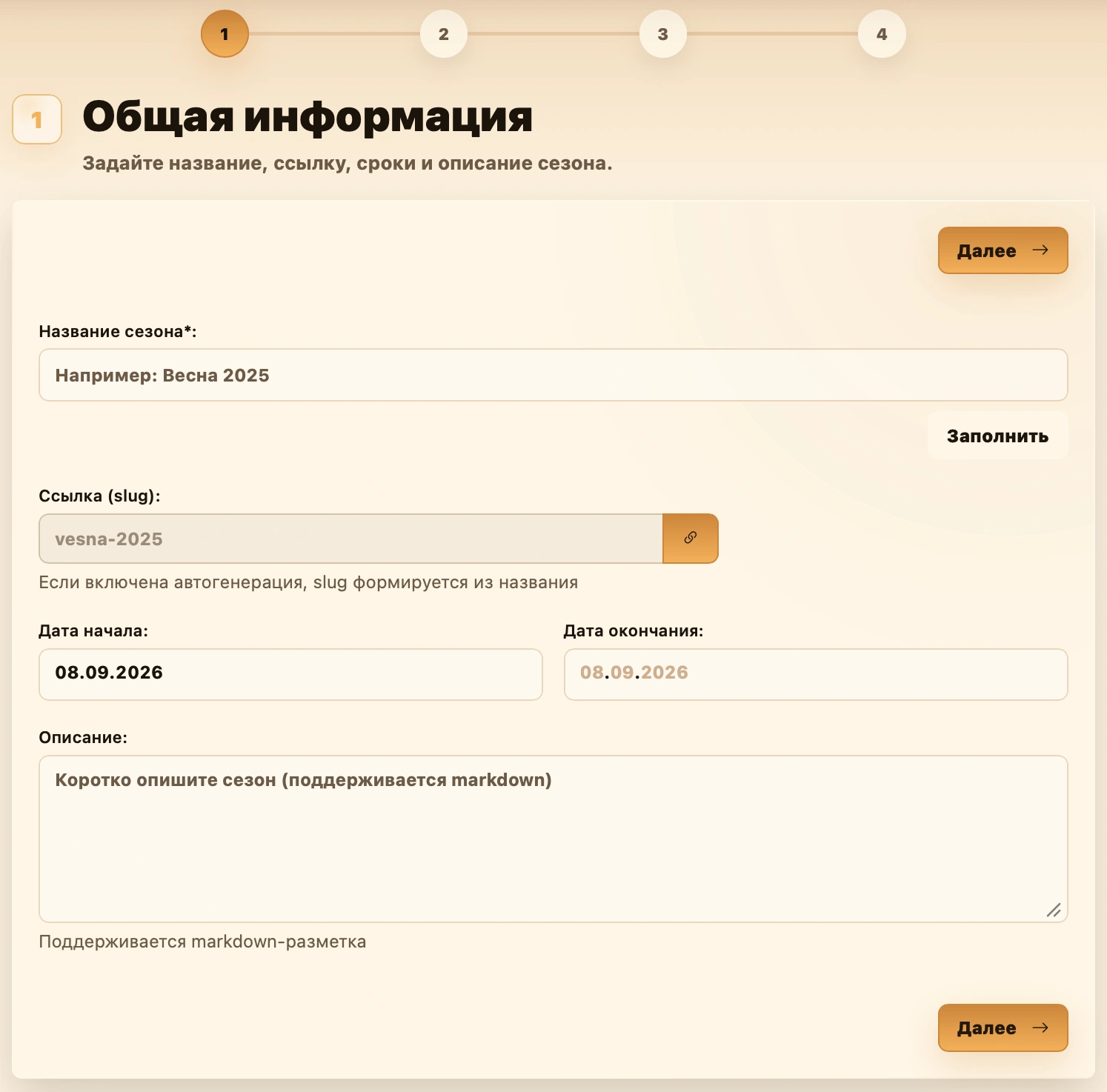
Name and URL
| Field or button | Action |
|---|---|
| Season name | Enter a clear name such as Autumn 2026 or Club League 2026. Required; at least four characters after trimming whitespace. |
| Fill | Suggests a name from the start date’s season and year, or today if no date is set. |
| URL (slug) | Check the short page address, automatically generated from the name. Lowercase Latin letters, digits and hyphens are allowed. |
To edit the URL manually, click the chain button . The field becomes editable. Re-enabling generation rebuilds it from the name.
For Autumn 2026, use autumn-2026, for example. Next checks availability. If taken, change it to something like autumn-2026-league and try again.
Dates and description
| Field | What to enter |
|---|---|
| Start date | Planned series start. Also used by Fill for the name. |
| End date | Planned finish. If both dates are set, it cannot precede the start. |
| Description | Explain the series, included events, winner rules and bonuses. Markdown is supported. |
Dates and description are optional. A date range does not automatically add tournaments; link them separately.
Check the name and URL, then click Next.
Step 2. Scoring settings
Define how completed tournament results become base season points. Bonuses are configured next and added afterward.
Scoring
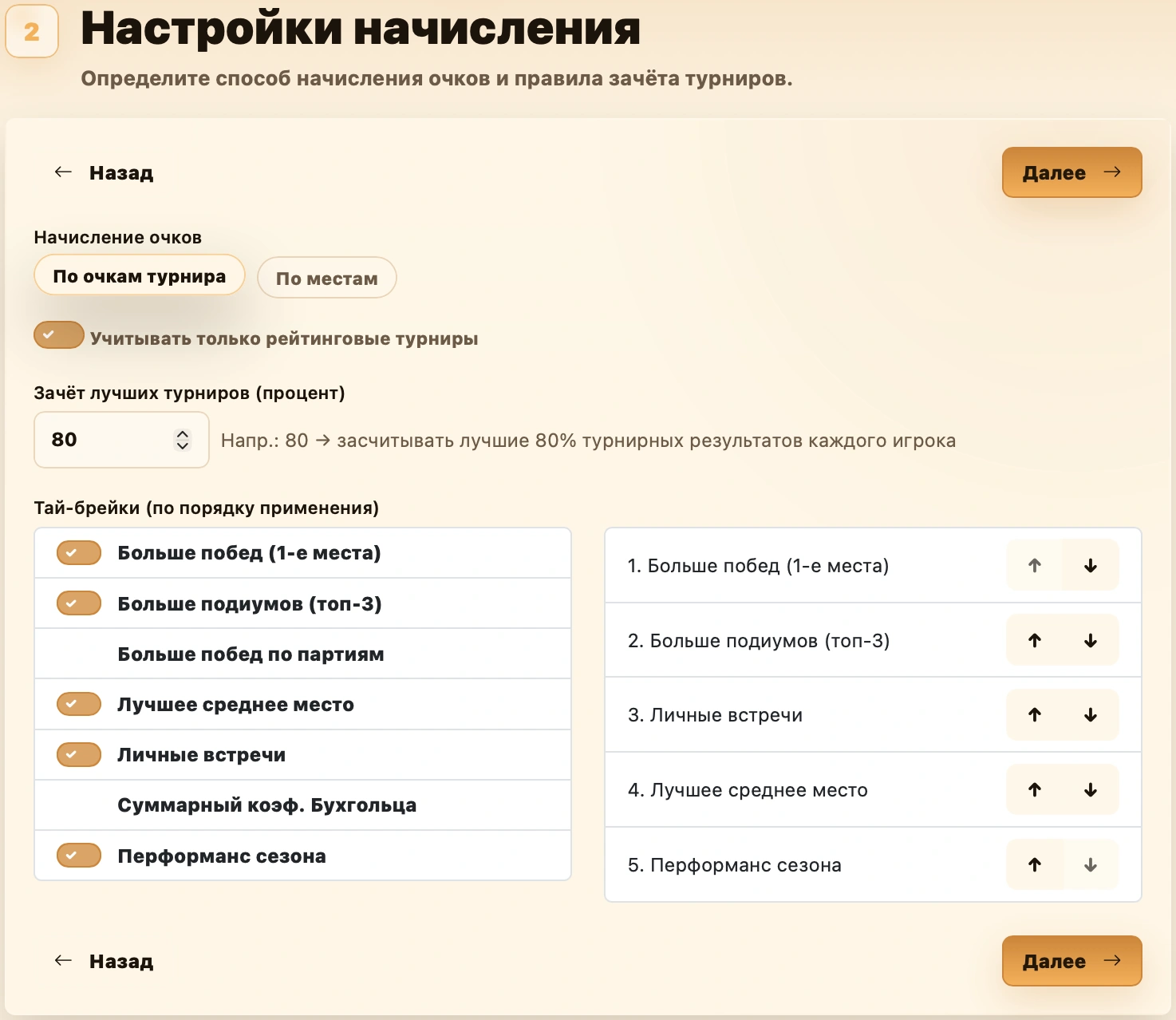
Choose one Scoring mode:
| Option | Calculation | Example |
|---|---|---|
| Tournament points | Transfer the player’s tournament score. | 3.5 tournament points give 3.5 base season points. |
| By places | Use an administrator-defined placement table. | First gets 10, second 9, third 8, and so on. |
By places opens Points for places.
Tournament points
Base season points equal the player’s final tournament score. Place does not matter: 3.5 points gives 3.5 season points whether second or fifth.
Counted results are added. Scores of 3.5, 4 and 2.5 total 10 points if all three events count. Bonuses are separate.
No placement table is needed. Equal tournament scores receive equal base awards regardless of tiebreaks. Rated-only filtering and best-result limits still apply.
Points for places
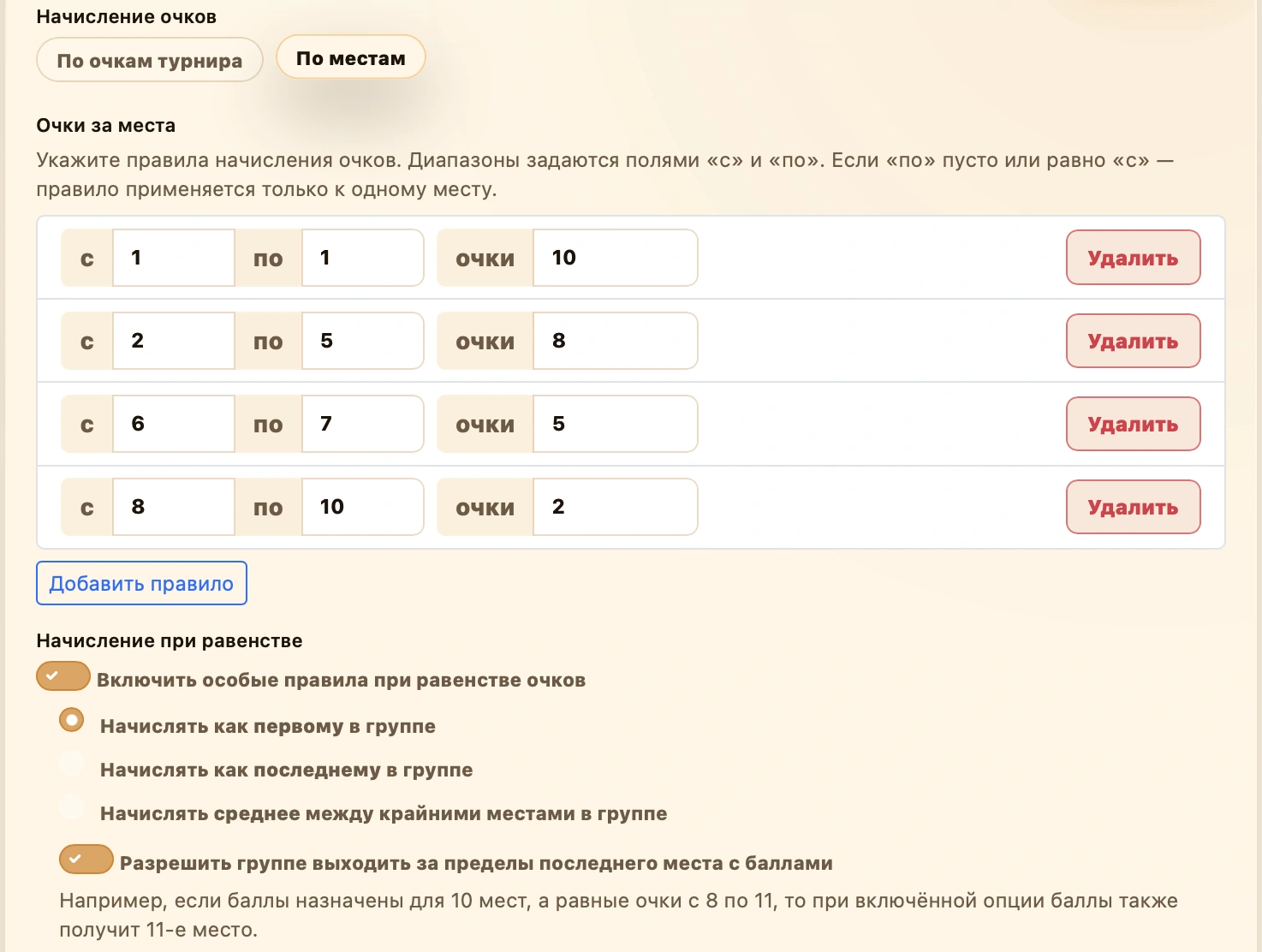
Each row defines a place or range receiving the same award:
| From | To | Points | Result |
|---|---|---|---|
| 1 | 1 | 10 | First place gets 10 points. |
| 2 | 2 | 9 | Second gets 9. |
| 3 | 3 | 8 | Third gets 8. |
| … | … | … | Continue decreasing. |
| 10 | 10 | 1 | Tenth gets 1. |
The initial table offers this countdown from 10 to 1. Every row is editable.
- From — first place in the range.
- To — last place, inclusive. Empty means only From.
- Points — award per player in the range. Fractions and negative values are allowed.
- Add rule — adds a scoring row.
- Delete — removes an unwanted row.
From 4 — To 10 — Points 2 gives every place from fourth through tenth two points. Replace their individual rows; overlapping ranges are invalid.
At least one row is required. Places must be positive integers and From cannot exceed To. Unspecified places receive zero, except for the group-extension rule below.
Tied-result scoring
Available only by places. It applies to players with equal points in one tournament, even if tiebreaks place them differently.
With Enable special rules for tied points off, everyone receives the award for their final place.
When enabled, choose one award for the tied group:
| Mode | Award |
|---|---|
| As first in group | Award for the group’s highest place with configured points. |
| As last in group | Award for its lowest place with configured points. |
| Average across the group’s places | Arithmetic mean of configured awards from the first through last covered place. |
Example. Three equal-scoring players occupy places 2, 3 and 4, worth 9, 8 and 7 season points:
Special rules off: 9, 8 and 7 respectively.
As first: 9 each. As last: 7 each. Average: 8 each, because (9 + 8 + 7) / 3 = 8.
Extending beyond the last scoring place
Allow the group beyond the last place with points controls whether tied players outside the scoring table also receive points.
Suppose scoring ends at tenth: eighth gets 3, ninth 2, tenth 1. Places 8–11 have equal tournament points and As first is selected:
| Checkbox | Awards |
|---|---|
| Off | Eighth, ninth and tenth get 3 each; eleventh gets 0. |
| On | All four, including eleventh, get 3 each. |
If no group place falls within the scoring table, everyone gets zero even with the checkbox enabled.
Which tournaments count
Count only rated tournaments excludes friendly events. Disable to allow both. See Rated status.
In all cases, only completed tournaments linked to and included in the season count.
Counting best tournaments, for example 80%
Enter an integer from 1 to 100 under Best tournaments (percentage), or leave empty to count all.
At 80% with ten eligible season events, each player counts at most eight best results. Someone who played six can count all six. The limit uses the season’s event count, not 80% of each player’s attendance.
| Award | Effect of the limit |
|---|---|
| Base points | Selected best events only. |
| Automatic rule bonuses | Selected best events only. |
| Manual bonuses and Extra bonus | All eligible events, including those outside the best results. |
Selection first compares base season points, then base plus automatic bonuses on ties. Manual bonuses do not affect selection. Only enabled awards count.
Use Full table in the leaderboard for all results. See Best results and tiebreaks.
Tiebreaks
Tiebreaks order players with equal season points. They do not alter the tied-score awards for individual events described above.
- Select criteria from the list.
- Arrange selected criteria in application order in the adjacent list.
- Use and : the top criterion is checked first.
| Criterion | Comparison |
|---|---|
| More wins (first places) | Tournament wins. |
| More podiums (top three) | Top-three finishes. |
| More game wins | Games won. |
| Better average place | Average tournament place; lower is better. |
| Head-to-head | Results between the compared players. |
| Total Buchholz | Combined Buchholz value. |
| Season performance | Performance based on results and opponent strength. |
With tournament wins first and podiums second, tied points are compared by first-place count, then podiums only if still equal. TB1, TB2 and subsequent labels show this order in the leaderboard.
Step 3. Bonus points
Bonuses are optional; continue without fields or rules if unnecessary. They add season points but do not change game results or tournament places.
Adding a manual field
Use manual fields for administrator-recorded reasons, such as Receipt bonus for spending at a bar.
- Enter the field name.
- Check the generated code (slug); the chain button allows manual entry.
- Optionally add a description.
- Click Add and check that the field appears.
The code must be unique within the season, at most 20 characters, using lowercase Latin letters, digits and single hyphens between parts.
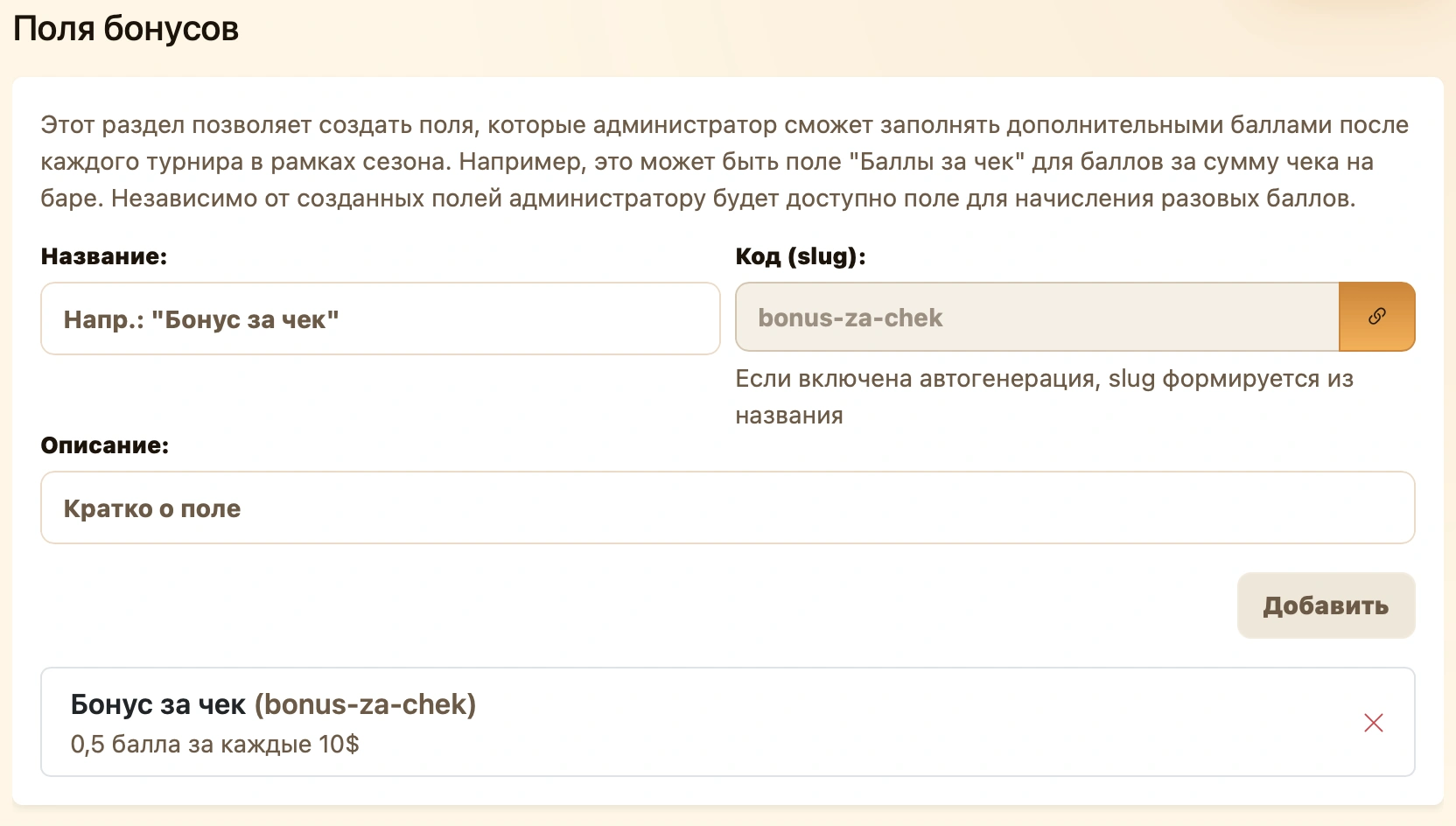
Remove an unwanted field using . Creating a field alone does not award points.
Manual values can be saved before completion and corrected afterward. Extra bonus handles one-off awards without a named field.
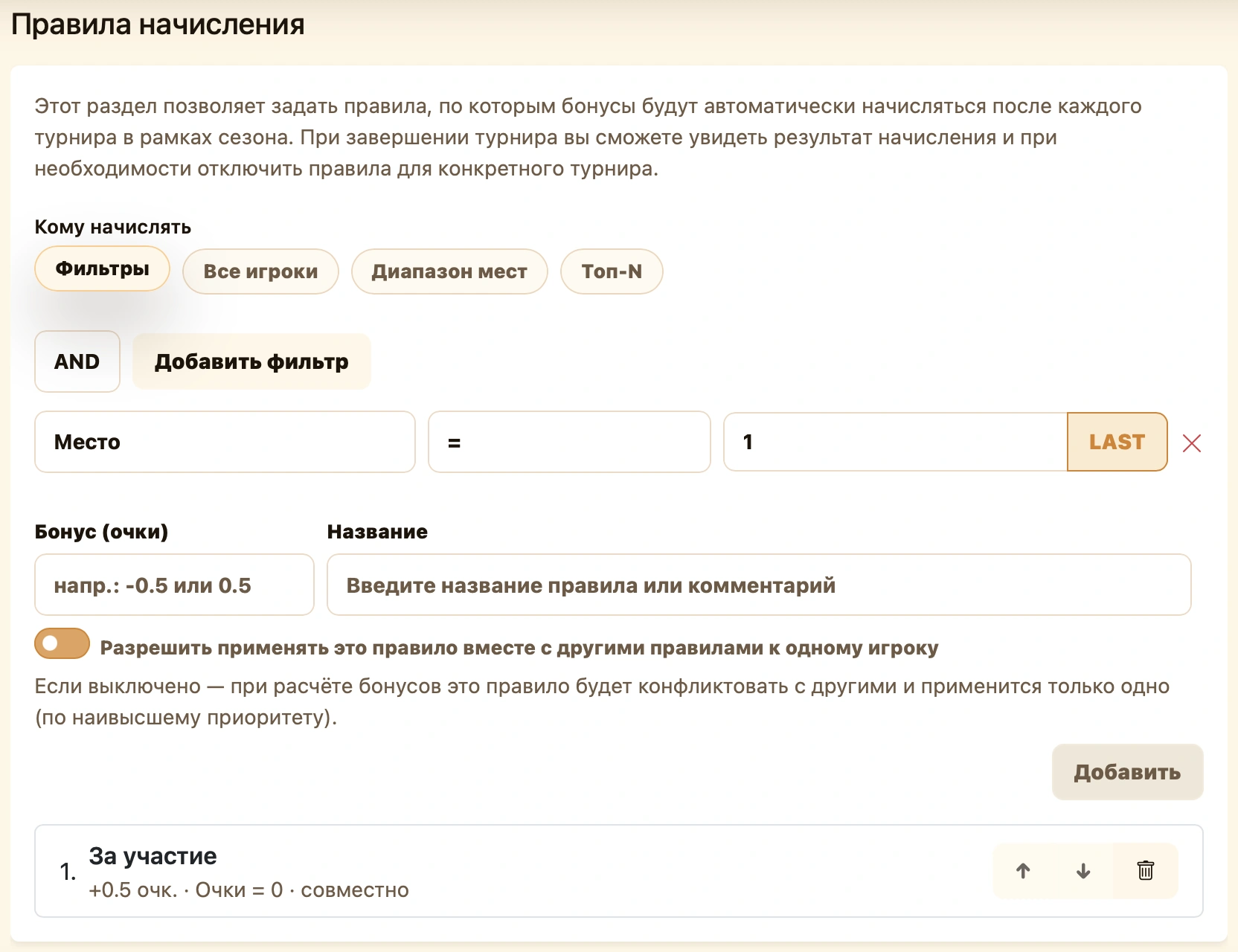
Adding an automatic rule
- Under Award rules, choose recipients.
- Set places, player count or filter conditions.
- Enter Bonus (points) and the rule name.
- Choose whether it stacks with other rules.
- Click Add and check that the rule appears.
| Recipients | Example |
|---|---|
| All players | +1 for everyone in tournament standings. |
| Place range | +0.5 for fourth through sixth. |
| Top N | +1 for each of the first three. |
| Filters | +0.5 for players on zero tournament points. |
Filters support place, points and place in group. AND requires all conditions; OR at least one. A group consists of players selected by the rule, not a separately created tournament group. See Conditions and filters for equal scores, third-place references and group leaders.
Priority and stacking
Rules apply from top to bottom. Reorder using and . Remove an unwanted rule using .
Allow this rule to apply with other rules to the same player controls compatibility:
| Mode | Award when several rules match |
|---|---|
| Stacking | Adds compatible awards unless a separate rule has already applied. |
| Separate | Applies only if no earlier rule awarded points. Subsequent rules for that player are skipped. |
Stacking Everyone +1 and Top 3 +2 gives prize winners +3. If the higher Top 3 +2 rule is separate, prize winners get only +2; others can still get +1 from the following rule.
Disabled or nonmatching rules do not block later awards. Each player is checked separately.
See Season bonuses for illustrations and award management. Here you configure fields and rules; check player amounts in each event’s bonus dialog.
Step 4. Confirmation and launch
Review the collected settings before creation:
| Block | Check |
|---|---|
| General information | Name, URL, dates and description. |
| Scoring | Mode, places/ranges and tied-score distribution. |
| Restrictions | Rated status and counting percentage. |
| Tiebreaks | Selected criteria and order. |
| Bonuses | Required fields/rules are listed; amounts and compatibility are correct. |
Use Back to correct settings, then return. When ready, click .
After saving, the season page opens with status Created. Start the season separately on its page.
After creation
Administrators can change status and add tournaments using the menu beside the season name.
Changing season status
- Open the season in your club context.
- Click the three-dot menu beside its name.
- Choose the appropriate action below.
- Wait for saving; the header status changes.
| Current status | Menu action | New status |
|---|---|---|
| Created | Start season | Active — the series begins. |
| Active | Finish season | Finished — the series ends. |
| Finished | Resume season | Active — the series continues. |
| Active or Finished | Return to Created | Created — back to preparation. |
Status changes immediately without a separate Save. Season status does not start or finish its tournaments; manage those on their own pages.
Adding a new tournament
Use this when the tournament has not been created yet.
- Open the season’s three-dot menu.
- Choose Add new tournament to open creation.
- At step one, check Season; the current season is preselected.
- Complete the remaining tournament creation steps.
- Return to the season’s Tournaments tab to check the new event.
You can also use Create → Tournament in the general menu, then select the season manually at step one.
The new event is linked immediately; its result counts after completion, subject to season settings.
Adding existing tournaments
- Open the season menu and choose Add past tournament.
- Wait for club events not yet linked to a season.
- Use Search… and check names, dates and statuses.
- Select one or more. Selected shows the count. Select all includes every search match across pages; Clear deselects all.
- Click Add selected tournaments, available after selecting at least one.
- Wait for success and the dialog to close. Check Tournaments and completed-event results in the leaderboard.
Despite its name, Add past tournament offers different statuses. Only completed results count. Events linked to another season are not offered.
Close exits without adding and resets selection.
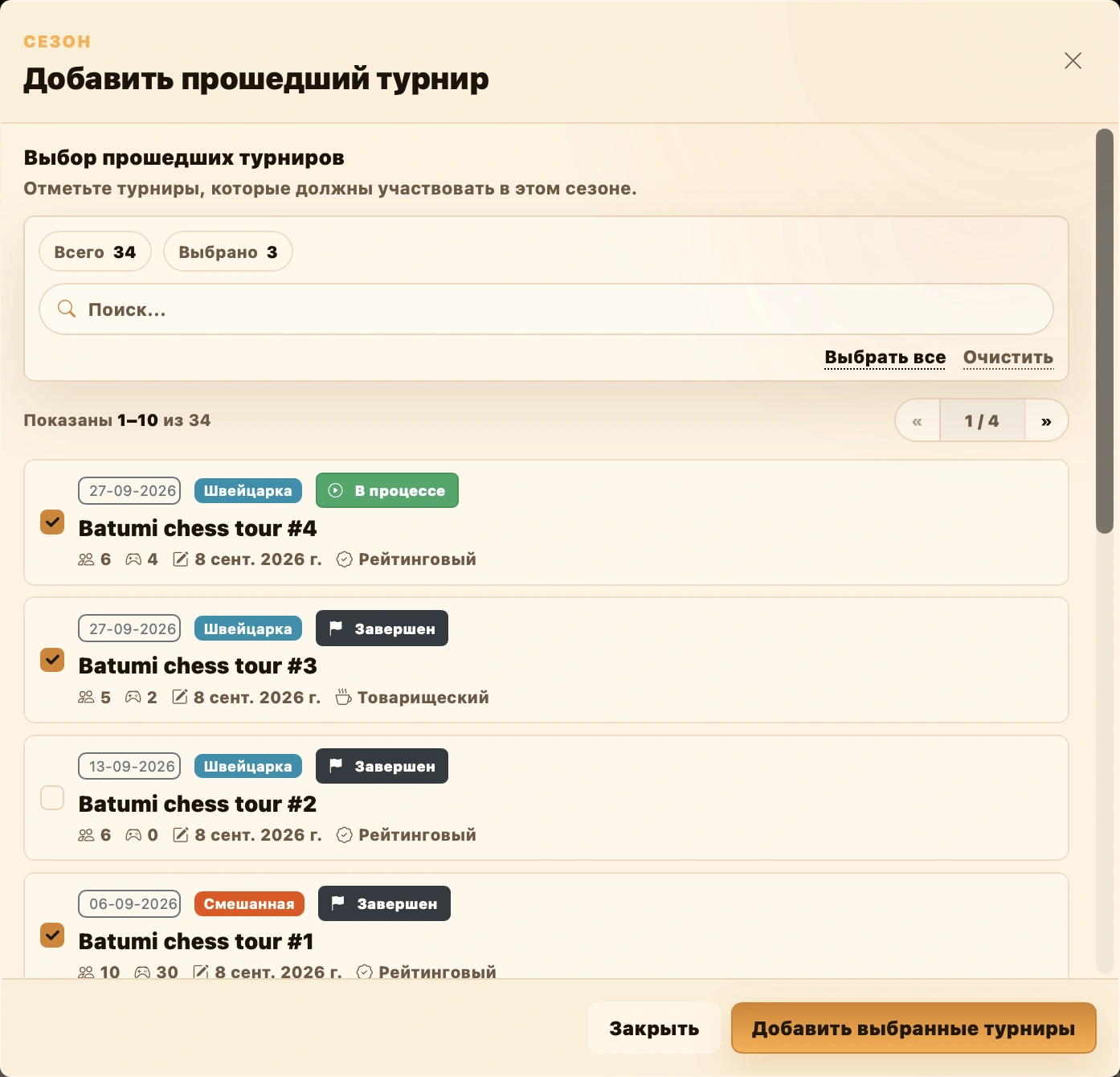
Completed events contribute after inclusion. Check field and rule awards in the tournament bonus dialog.
If you cannot continue
| Situation | Check |
|---|---|
| Next disabled at step one | Name has at least four characters, URL is filled and dates are valid. |
| URL taken | Disable generation and choose another address. |
| Placement table error | At least one row, positive integer places, From ≤ To, no overlapping ranges and numeric points. |
| Counting percentage error | Enter an integer 1–100 or clear it. |
| Manual field not added | Name is filled; code is valid, unique and at most 20 characters. |
| Bonus missing in confirmation | Click Add; filling the form alone does not add it to the list. |
| Creation error | Wait for the request and read the message. If saving is uncertain, check the season list before creating again. |