Season bonuses
Bonuses add season points for a player. They implement club rules such as rewarding attendance, prize places or special achievements. Positive values add points; negative values subtract them.
A bonus can belong to a particular tournament or reward a separate activity outside tournaments. It affects season standings, not played-game results. The club administrator defines award conditions.
This article focuses on tournament bonuses. For online events and other activities not recorded as tournaments in the service, use Bonuses outside tournaments, managed from the season page.
Bonus types
| Type | How it is awarded | Example |
|---|---|---|
| Manual bonus | An administrator enters a value in a named season field for a player. | A bar tournament may award points for spending at the venue. The administrator enters a receipt-based bonus under season rules. |
| Extra bonus | A one-off adjustment without a separate field. | +0.5 or −0.5 at the club’s discretion. |
| Automatic bonus | The service checks results against a rule and calculates the award. | +1 for each top-three finisher, or an attendance bonus for players with zero tournament points. |
| Bonus outside tournaments | An administrator records points under a separate season field, with a date and comment, without linking a tournament. | Regular online events held elsewhere. |
Tournament manual fields and automatic rules are configured when creating a season. Fields for outside-tournament awards are added from the season page. Each season can have different bonuses.
How bonuses affect results
Enabled manual and automatic awards are added to base season points for an event. Base points follow season rules: placement points or tournament scores.
Example for one tournament
9 base points + 1 manual bonus + 0.5 automatic bonus − 0.5 adjustment = 10 season points.
Season standings use eligible completed tournaments. A best-results limit such as 80% affects bonus types differently:
| Award type | Treatment under a tournament limit |
|---|---|
| Manual bonuses and Extra bonus | Count from every eligible event, including those outside the best results. Do not affect best-event selection. |
| Automatic bonuses | Count only from selected best events. Other events’ automatic awards are excluded. |
| Bonuses outside tournaments | Count in full regardless of the best-tournament limit. |
For a player in all ten events with eight counting, manual bonuses total across ten and automatic bonuses across eight. Selection first compares base season points, then automatic bonuses on ties.
Only fields and rules enabled for that event count. See Seasons.
Where players see awards
The season leaderboard has separate bonus columns:
| Label | Meaning |
|---|---|
| B1, B2… | Individual manual bonus fields. |
| R1, R2… | Individual automatic rules under Additional rules. |
| Σ | Total within the corresponding award group. |
| ΣΣ | Combined bonus total. |
| Points | Overall player score including bonuses. |
Hover over a field or rule header for a tooltip. Expand a player’s row to see tournaments, points, bonus columns and per-event totals. Counted and Excluded labels identify selected results.
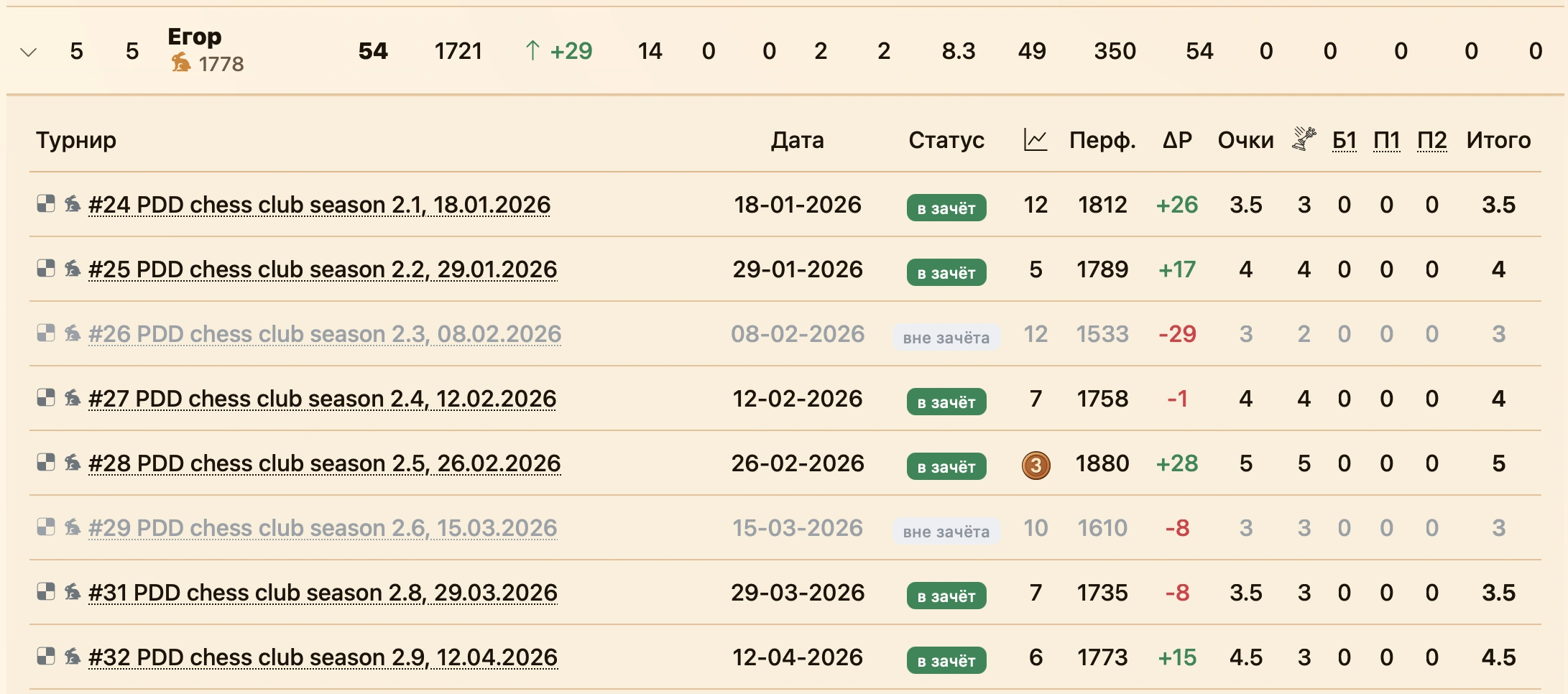
Outside-tournament awards appear in the same player details under Bonuses outside tournaments, with dates, comments and a total. See Leaderboard results.
Administrator guide
Club administrators only
The following actions configure and edit tournament bonuses and require club administrator access. The tournament must be linked to a season. For awards without a tournament, see the separate guide.
Choosing an award method
| Task | Use |
|---|---|
| The same reason recurs across events | A named manual field with a clear description. |
| A one-off adjustment | Extra bonus. |
| Eligibility follows player place or points | An automatic rule. |
| A field or rule does not apply to one event | Disable it in that event’s bonus dialog. |
| Points come from activities outside the service’s tournaments | Add an entry from the season page. |
Describe award reasons and amounts in season rules beforehand so players understand scores and administrators apply them consistently.
Configuring manual fields
At Bonus points in season creation, add a manual field:
- Enter a name explaining the award.
- Check the code (slug), generated from the name. The link button enables manual entry. Codes must be unique among fields, at most 20 characters, using Latin letters, digits and hyphens.
- Optionally describe why and how many points are awarded.
- Click Add and check that the field appears.
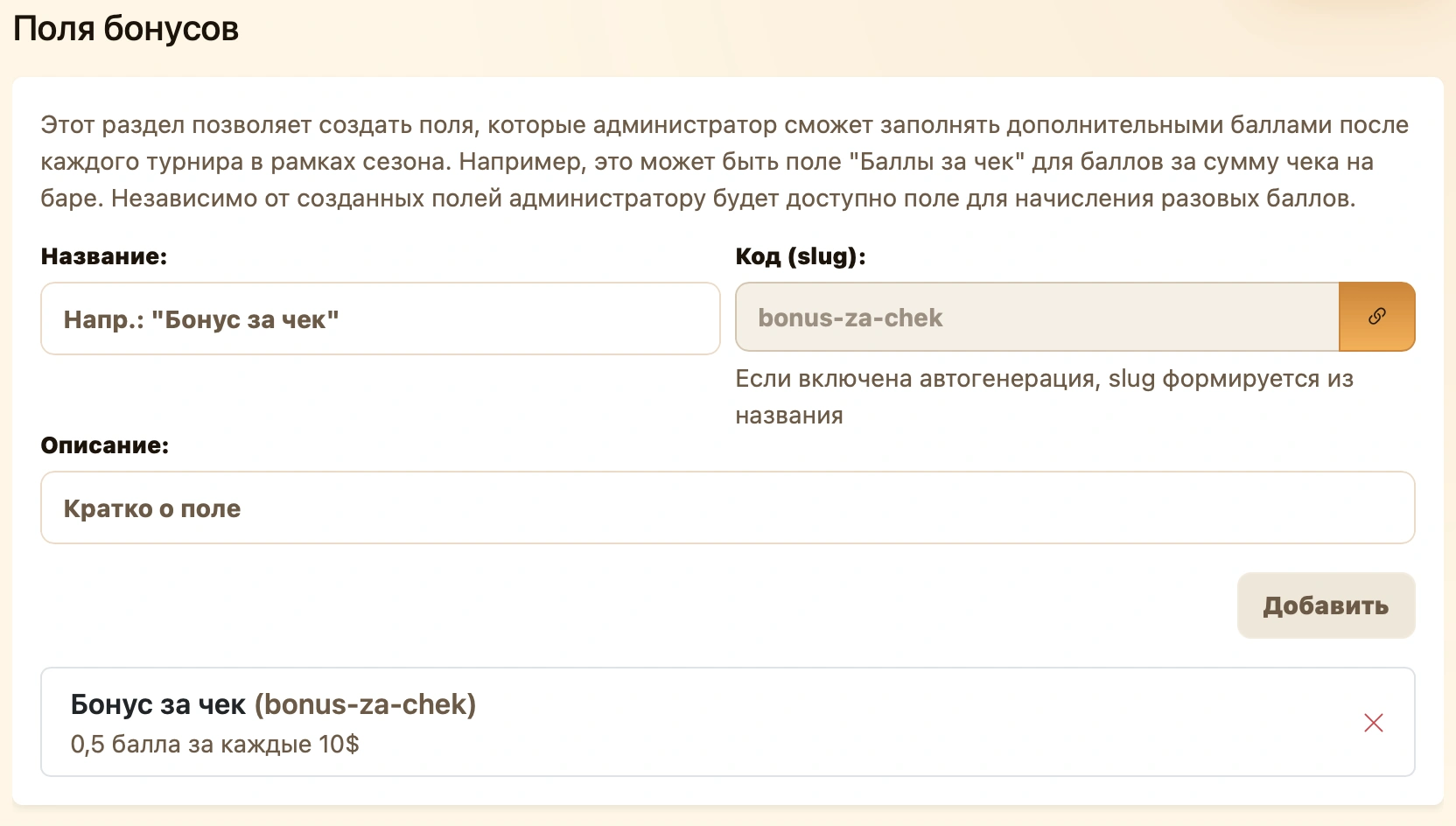
Enable or disable the field per event in Manual bonuses in its bonus dialog.
Creating a field adds a column but does not award points. Enter values separately for each tournament. Remove an unwanted field in the wizard with .
Configuring automatic rules
At the same wizard step, choose recipients:
| Option | How it works |
|---|---|
| All players | Everyone in tournament standings. |
| Place range | Players between the specified places, inclusive. |
| Top N | The first N players in standings order. |
| Filters | Players matching combinations of place, points or position within a selected group. |
Set Bonus (points), enter the rule’s name, choose stacking behavior and click Add. Values may be positive or negative. Check the rule is listed, then complete season creation to save it.
Conditions and filters
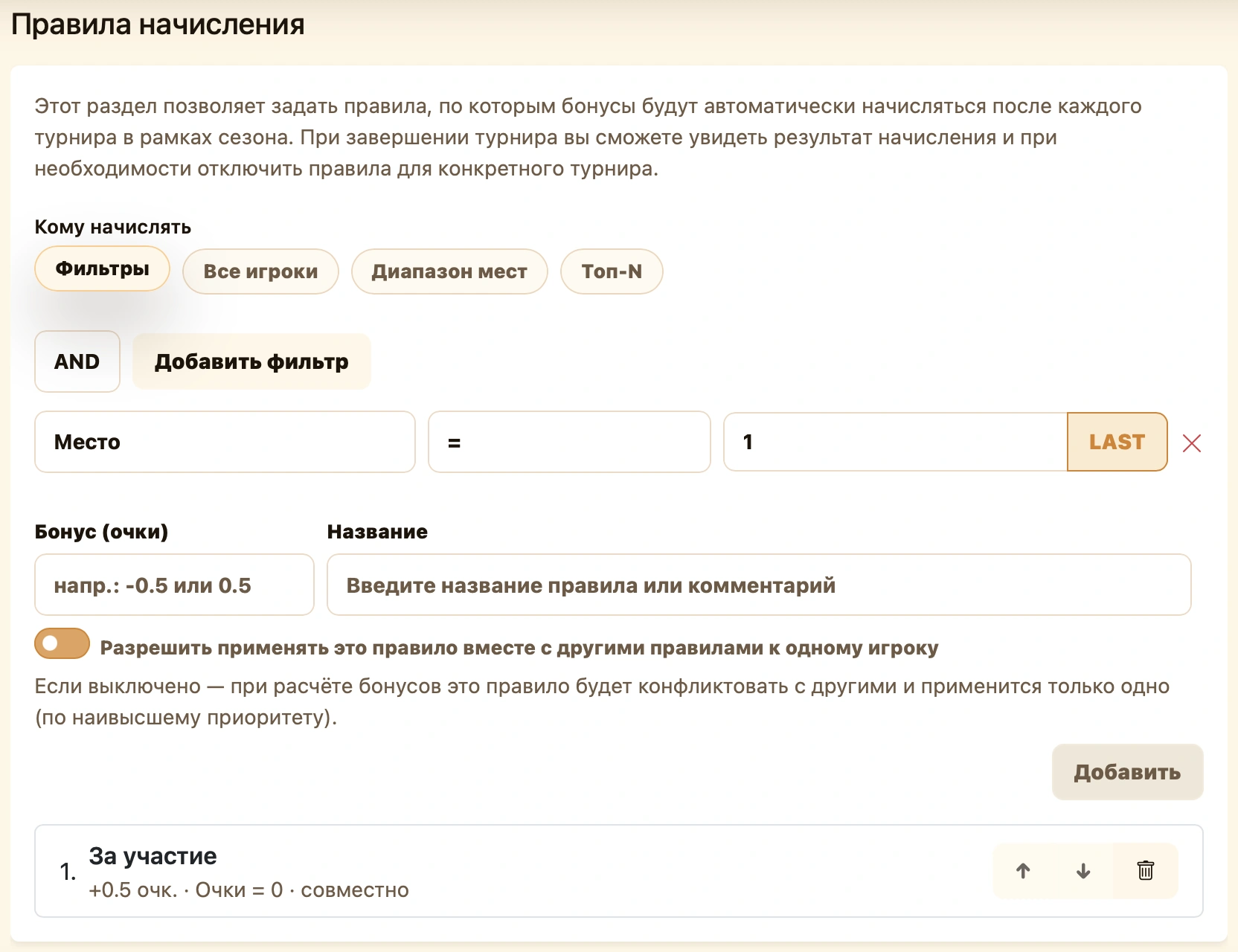
Add filter adds another condition. Comparisons include =, ≠, >, ≥, <, ≤.
- Place — position in tournament standings. Place ≤ 3 selects the top three.
- Points — tournament score. Points ≥ 4 selects at least four points.
- Place in group — position among players selected by the bonus rule, retaining standings order. Examples follow below.
AND requires all conditions; OR requires at least one. Place > 3 AND Points ≥ 4 selects players outside the top three with at least four points.
LAST inserts last place so the rule does not depend on field size. Points has two additional comparison modes:
- equal — selects players sharing their points total with at least one other participant;
- place reference — compares against the score of the participant at a given place rather than a fixed number. Points = with place reference 3 selects the third player’s score. LAST is also available.
Places and tied points
Top N and place ranges use standings positions. To include everyone sharing the boundary player’s score, use a points filter with a place reference.
What Place in group means
A group is the set selected by rule conditions. No separate group creation is needed: the service filters by place or points, then numbers the selected list from 1. These are bonus-selection groups, not tournament-stage groups.
Example 1: reward the leader of each tied-score group. Places 2–4 have 5 points; places 5–6 have 4 points. Reward the highest-ranked player by tiebreaks in each group.
Combine Points — equal and Place in group = 1 with AND. The first identifies tied-score groups; the second selects each group’s leader in standings order.
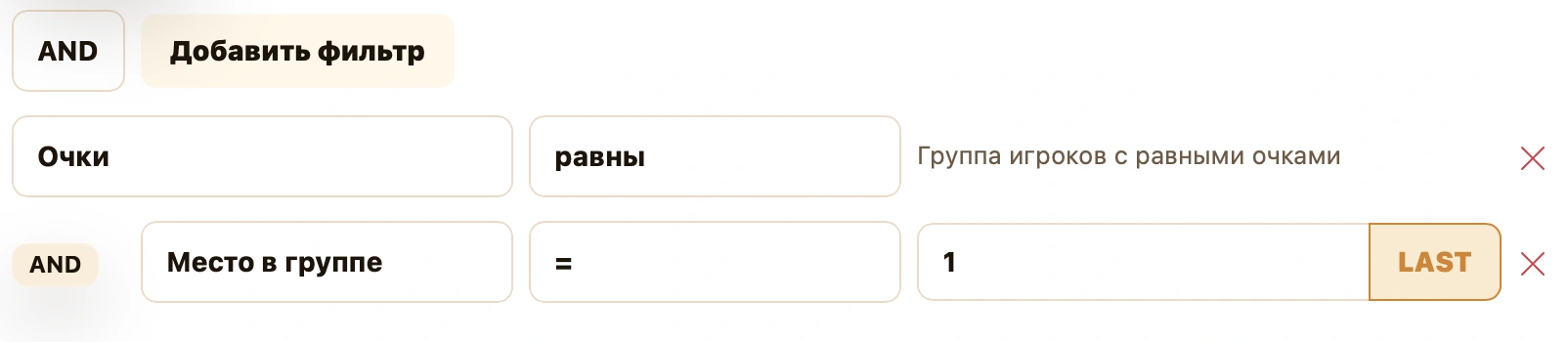
| Points | Tournament places | Places within group | Bonus recipient |
|---|---|---|---|
| 5 | 2, 3, 4 | 1, 2, 3 | Player in tournament place 2 |
| 4 | 5, 6 | 1, 2 | Player in tournament place 5 |
With a +0.5 award, each leader gets +0.5. A player with a unique score does not match Points — equal.
Use AND for Place in group: it refines an existing selection. Currently, OR does not apply the group-position condition.
Example 2: reward players who lost third place on tiebreaks. Award everyone outside the top three with the same points as third place.
The screenshot combines three conditions with AND:
- Points — equal selects players sharing a score.
- Points = 3 with place reference enabled compares against third place’s points. Here 3 is a place, not a score.
- Place > 3 keeps players outside the top three.
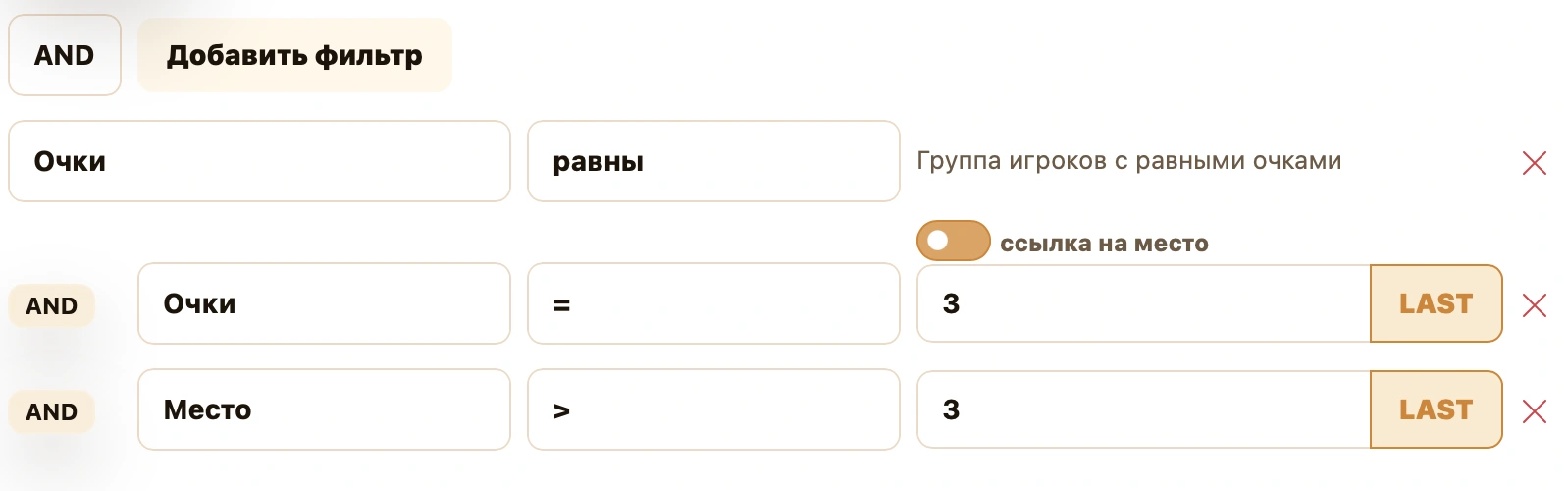
If places 3, 4 and 5 have 4.5 points and sixth has 4, fourth and fifth receive the bonus. They lost third place only on tiebreaks. Third and sixth do not satisfy all conditions. Place in group is unnecessary because everyone matching receives the award.
Stacking and priority
Allow this rule to apply with other rules to the same player controls stacking. When disabled, conflicts are resolved by priority and only the higher-priority rule applies.
Reorder rules using and in the list. Higher rules have greater priority. Remove an unwanted rule with .
Stacking. Everyone +1 gives all players one point, and Top 3 adds two to prize winners. Both allow stacking, so the top three get +3, everyone else +1.

Separate application. In the next example, both rules give +1 and are separate. Top 3 is higher priority. Prize winners get +1 only from Top 3, without Everyone’s extra award. Others get +1 from Everyone.

Check overlapping conditions using a specific player. Decide in advance whether prize bonuses should add to attendance bonuses.
Opening tournament bonuses
On the tournament page, click Bonuses beside the season name to open Additional season points. It remains available after completion.
If the button is missing, check that you administer the correct club and the event is linked to a season.
Dialog contents
The top contains player/award summaries, player search and display switches. Below are participants and the Manual bonuses and Automatic rules panels.
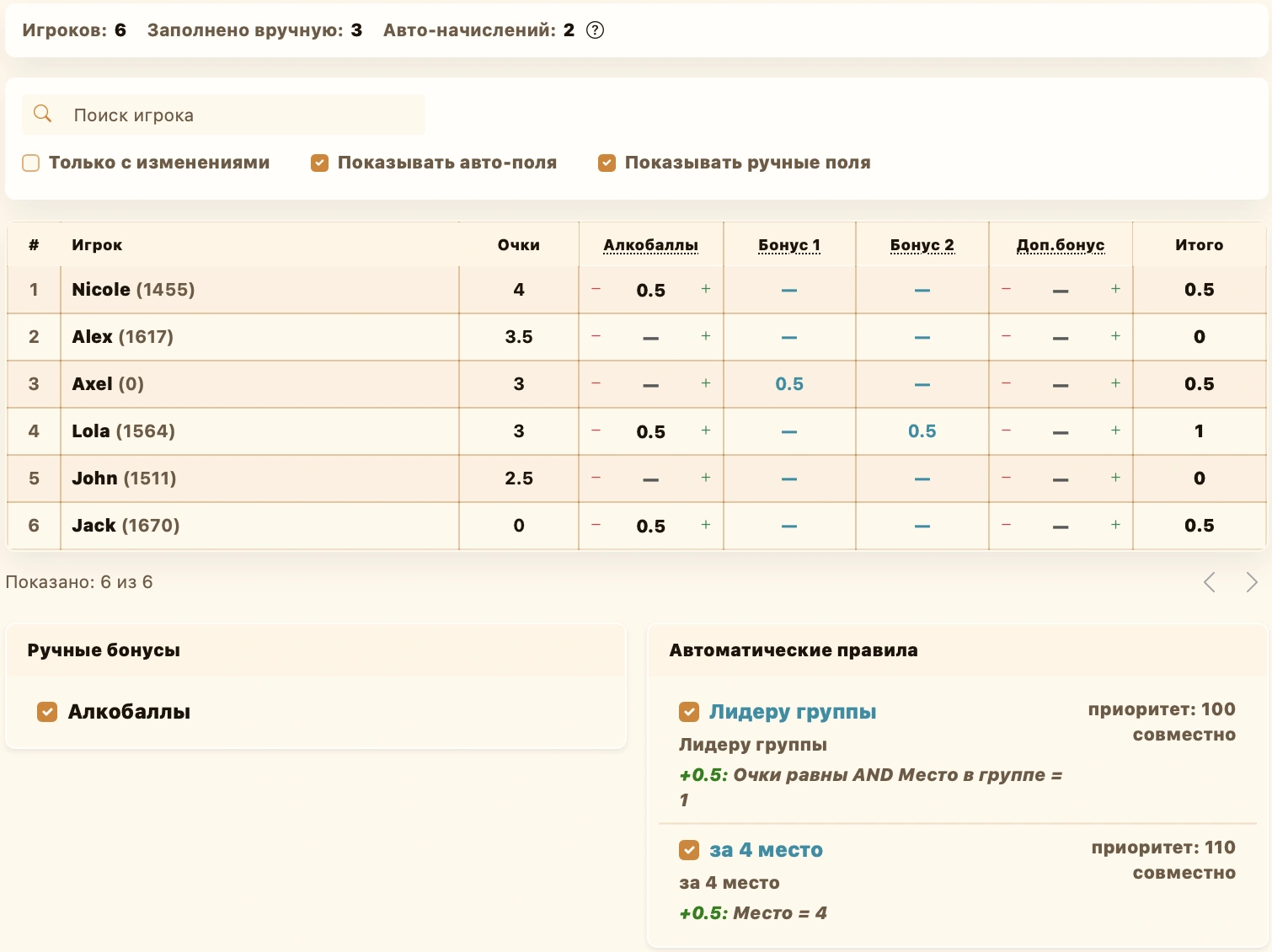
| Column | Purpose |
|---|---|
| Player | Participant name and rating. A row with an arrow indicates a player connected through substitution. |
| Points | Main tournament standings points. For substitutions, combines the slot’s players; replaced players show —. Missing standings rows also show —. |
| Named manual fields | Entry cells for season fields. |
| Bonus 1, Bonus 2… | Automatic awards, view-only. Header tooltips explain the rules. |
| Extra bonus | A one-off manual award or adjustment. |
| Total | Additional awards only, excluding the Points column. |
Two different totals
In Additional season points, Total sums bonuses only. In expanded leaderboard rows, Total is the event score including bonuses.
Awarding or correcting a manual bonus
- Find the player with Player search.
- Choose a named field or Extra bonus.
- Enter
1,0.5,-0.5or another value with one decimal place. Minus/plus changes it by 0.5. - Clear the cell or enter 0 to remove an award. Replace the value to correct it.
- Check Total and click Save at the bottom.
Enter the full award value, not an increment to the saved value. To change 1 to 1.5, enter 1.5 or click plus once.
Hiding columns and disabling awards
These actions differ:
| Control | Effect |
|---|---|
| Show manual fields / Show automatic fields above the table | Visibility only. Hidden awards still count. |
| Only changed | Shows rows with edited manual values, not all bonus recipients or toggle changes. |
| Field checkbox under Manual bonuses | Includes or excludes that field for all players in this event. Disabled columns cannot be edited. |
| Checkbox under Automatic rules | Enables or disables the rule for this event. |
Disabling a field preserves entered values; re-enabling can include them again. Clear a player’s cell to remove their award. Click Save to persist checkbox changes.
Checking automatic awards
Automatic rules shows name, conditions, amount, priority and stacking/separate mode. Compare these with player results and the corresponding column.
Before tournament completion, automatic values are provisional. Final automatic bonuses are saved for completed events. Manual values can be saved early and corrected afterward.
Automatic cells cannot be overwritten. For a specific adjustment, use a manual field or Extra bonus under club rules. Disable the rule below if it should not apply to the whole event.
Saving and checking results
Save becomes available when changes exist. Success shows a saved message and closes the dialog. Close and the cross do not save.
Then open the season leaderboard and expand the player. Check the event’s award and counted status. After a save error, reopen the dialog and verify actual saved values before editing again.
Practical tips and common questions
- Missing field. Enable Show manual fields and check the season configuration. Use Extra bonus for a one-off award.
- Disabled cell. Check its Manual bonuses checkbox. Automatic cells are always read-only.
- Player disappears after editing. Only changed hides a row when it matches the saved value again. Disable the filter to see everyone.
- Missing automatic bonus. Check conditions, rule enablement, place, points and higher-priority conflicts. Awards are provisional before completion.
- Bonus appears in detail but not standings. Check event status, season settings and field/rule enablement. Best-event limits exclude automatic bonuses for excluded events, but not their manual bonuses.
- Recurring adjustment. Create a clear named field when preparing the season. Use Extra bonus for one-off entries and automate repeatable result-based conditions.